Workflowws at floww.center
On this page
Why a Hub?
A workfloww (named sequence of connected nodes on the canvas) is a reusable unit of AI-assisted work. Once you have built a workfloww that solves a problem well — a code review pipeline, a documentation generator, a research assistant — there is no reason to keep it private. Other people working on similar problems could use it immediately.
floww.center is the community hub where that sharing happens. It is the distribution layer for the floww ecosystem: publish what you built, discover what others have built, install with one click.
What Lives on the Hub
The hub hosts published workflowws, organized by category, use case, and complexity. Each published workfloww has a description, a list of node types it uses, a complexity rating, and a version history. The hub is not a package registry — it is a curated catalog. Workflowws are browsable by people who do not know exactly what they are looking for.
Community features include:
- Stars — bookmark workflowws you find useful or want to try later
- Forks — create your own customized version of any published workfloww
- Reviews — rate workflowws and describe how you used them
- Collections — curate themed sets of workflowws (by domain, by tool, by use case)
The catalog grows as the community builds. Early categories include code review, documentation generation, research assistance, debugging pipelines, and content creation. Each category develops its own norms around what makes a well-built workfloww — patterns emerge from the community rather than being imposed by the platform.
The Desktop-Hub Connection
The link between floww.center and the desktop client is the floww:// protocol. When you click “Open in floww” on a hub listing, the protocol handler launches the desktop client and installs the workfloww directly — no manual download, no configuration step, no zip file to unpack.
The installed workfloww appears on your canvas immediately, ready to use. You can run it as-is, or customize any node before executing. The customization stays local unless you choose to publish your fork.
The connection is intentionally tight. The hub is not a marketplace separate from the tool — it is a discovery interface into the same workflowws you use every day in your desktop client. What you publish from the client appears on the hub. What you install from the hub appears in the client. The boundary between them is the floww:// protocol, which means the handoff is seamless in both directions.
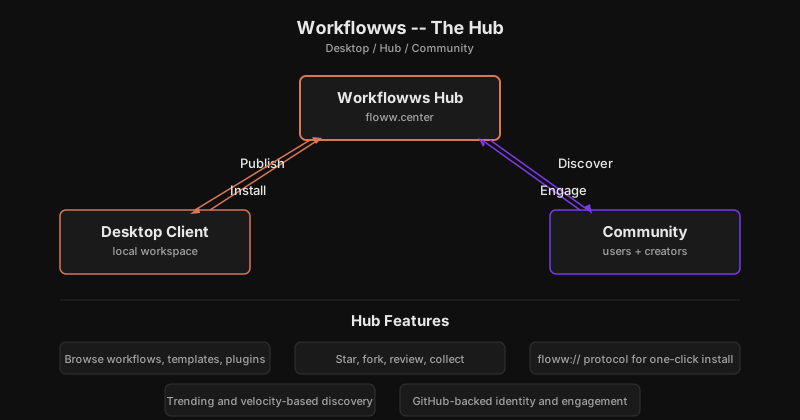
Community Features
The hub uses your GitHub account for identity. Stars, forks, and reviews map to familiar GitHub concepts — there is no new account or reputation system to learn. If you already have a GitHub account, you can publish on day one.
Publishing a workfloww is opt-in. Nothing leaves your desktop client without your action. When you choose to publish, you write a description, add tags, and set a complexity rating. The hub surfaces it to users browsing that category.
Why It Works This Way
Open source solves distribution but not discovery. A GitHub repo is findable if you know what to search for — but what if you do not know the right search terms? What if you want to browse by category, see what is trending, or find workflows recommended for your use case? The hub is a curated discovery layer on top of the open ecosystem. Everything on the hub is still accessible through standard tools — GitHub repos, the floww:// protocol. The hub adds the human layer: browse, compare, rate, collect. It makes the ecosystem navigable for people who are exploring, not just searching.
In Practice
You built a code review workfloww that chains three flowwLITEs: one to analyze the diff, one to generate review comments, and one to create a summary. It works well for your team. You publish it to the Workflowws hub with a description, tags, and a complexity rating. A week later, another developer discovers it while browsing the “code-review” category. They click “Open in floww” — the floww:// protocol installs the workfloww directly into their desktop client. They customize the prompt in the second flowwLITE for their coding standards and publish their fork back to the hub. The cycle continues: build, share, discover, customize, share again.
The Ecosystem Connection
floww.center is part of the broader floww ecosystem — connected to the desktop client through the floww:// protocol and to the community through GitHub identity. It is not a separate product; it is the social layer of the same system you use every day.
The hub grows with the ecosystem. As more workflowws are published, the catalog deepens. As categories emerge, they become navigation. As the community develops norms around quality and documentation, those norms surface through stars and reviews. The hub is designed to get more useful the more people use it — each published workfloww improves the catalog for everyone browsing it.