flowwLITE
What is flowwLITE?
flowwLITE is a specialized node type on the canvas that executes Claude. It is the primary interface between the user and AI in floww. When you want Claude to do something — write code, analyze a file, plan a feature — you do it through a flowwLITE node.
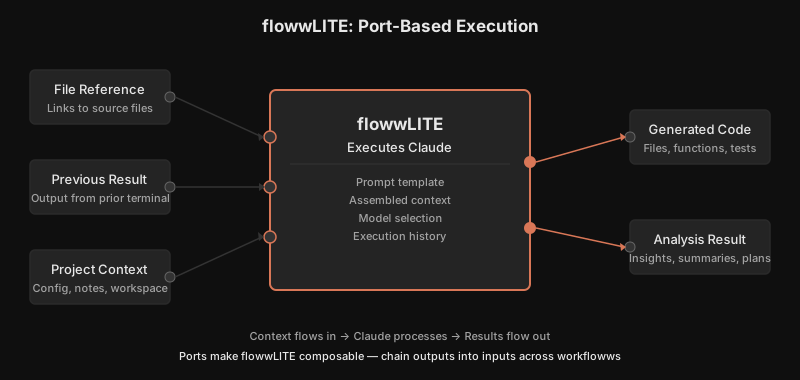
A flowwLITE is not a simple text box. It has input ports (context flowing in from other nodes), output ports (results flowing out to downstream nodes), and its own conversation state. The terminal manages the conversation with Claude, including context injection from connected nodes and automatic stamping when meaningful events occur.
Auto-Branching
One of flowwLITE’s defining behaviors is auto-branching. When Claude encounters a decision point with multiple viable approaches, the flowwLITE can automatically branch — creating a new workfloww for an alternative path while continuing the current one.
This means a single question can spawn multiple parallel explorations. The canvas makes these branches visible as diverging node paths, so you can see all approaches being explored simultaneously.
Input and Output
flowwLITE nodes receive context through their input ports — files, previous conversation results, project state. They produce output through their output ports — generated code, analysis results, decisions. This port-based architecture means flowwLITE nodes can be chained and composed on the canvas, with each node feeding context to the next.
Why It Works This Way
Most AI tools put the chat in a sidebar or separate window — a panel adjacent to the real work. flowwLITE puts the conversation directly on the canvas as a node, with input ports, output ports, and spatial position. This is not a cosmetic choice. When the conversation is a node, it can be connected to other nodes. Files, previous results, and project context flow in through ports. Generated code and analysis flow out. This makes AI conversations composable — the output of one flowwLITE can be the input of another, creating pipelines that are visible and inspectable on the canvas. The conversation is not separate from the work; it is part of the work’s structure.
In Practice
You create a flowwLITE and connect three input ports: a file reference node pointing to your database schema, a note node describing the migration requirements, and the output of a previous flowwLITE that analyzed your current queries. Claude receives all three contexts simultaneously and generates a migration plan that accounts for the schema, the requirements, and the existing query patterns. The output port carries the migration plan to a downstream flowwLITE that writes the actual migration files. On the canvas, you can see the entire chain — from inputs through processing to output.