workfloww
What is a workfloww?
A workfloww is a named sequence of nodes on the canvas. It is the primary workflow unit in floww. The deliberate double-w in the name distinguishes a floww workflow from generic workflows in other tools — when you see “workfloww,” you know it belongs to the floww ecosystem.
In version control terms, a workfloww is analogous to a branch. Just as a git branch represents a path of development, a workfloww represents a path of work on the canvas. Multiple workflowws can exist in the same project, each representing a different approach or task.
How Workflowws Work
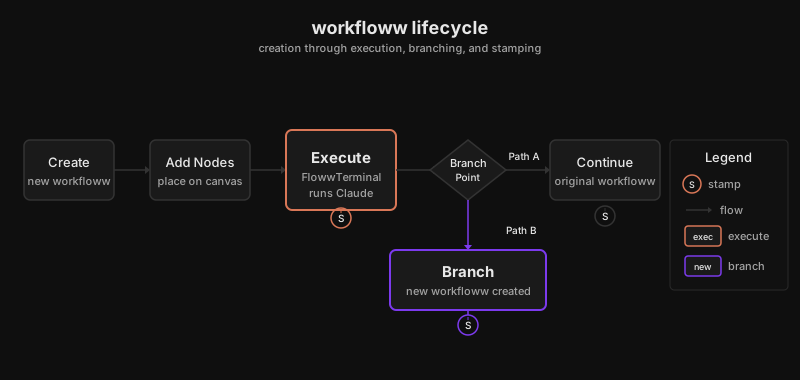
You create a workfloww by connecting nodes on the canvas. A flowwLITE node executes Claude within the workfloww’s context. When Claude reaches a meaningful decision point or completes a significant task, the system creates a stamp — a snapshot that preserves the current state.
Workflowws can branch. When a flowwLITE node encounters a decision point with multiple viable paths, it can automatically create a new branch — a new workfloww that diverges from the current one. This makes workflowws inherently non-linear. They are not simple sequences but branching paths of work.
Naming
Workflowws are named by the user or auto-generated from context. The name should describe the intent of the work path, not the technical steps involved.
Why It Works This Way
Real work is not linear. You start with one plan, discover a better approach, realize the first approach was right after all, or find you need both running in parallel. Traditional workflow tools force linear execution — step 1, step 2, step 3. Workflowws acknowledge that exploration IS the work. Branching is not an exception to handle; it is the primary mechanism for how complex problems get solved. Every branch is a hypothesis, and stamps are the evidence of what each hypothesis produced. The double-w is not a typo — it is a signal that this is not the generic concept of “workflow” but something specific to floww’s branching, visual paradigm.
In Practice
You name a workfloww “feature-auth” and add a flowwLITE to implement OAuth. Claude starts with a session-based approach. Midway through, it identifies that token-based auth would integrate better with your existing API. The flowwLITE branches — “feature-auth” continues with sessions, and “feature-auth-tokens” explores the alternative. Both are visible on the canvas. You compare the stamp history of each, pick the token approach, and archive the session branch. The exploration was not wasted — it informed the final decision, and its stamps remain as a record of why you chose tokens.