The floww Ecosystem
On this page
What is the floww Ecosystem?
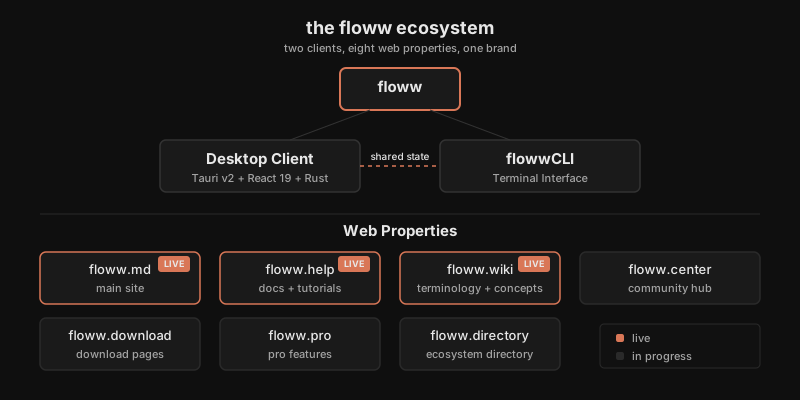
The floww ecosystem is two clients and eight web properties, all built around one product: the visual AI workspace.
The Desktop Client (Tauri v2, React 19, Rust) is the canvas where you see and shape your work. flowwCLI (the terminal companion) is where you execute it — 11 agents, 33 commands, 34 workflowws (named sequences of nodes on the canvas). Both read the same project state, the same plans, the same stamps (context-aware snapshots). There is no sync layer between them.
All web properties are built on Astro 5.x, deployed via Vercel as static sites.
The Domains
- floww.md — The main site. The front door to the product.
- floww.help — Documentation and tutorials. Step-by-step guidance for using floww.
- floww.wiki — Terminology and concepts. You are here.
- floww.center — Community hub for sharing workflowws. Becoming the Workflowws platform for discovering, sharing, and managing AI workflows.
- floww.download — Download pages for the desktop client.
- floww.pro — Pro features and subscription information.
- floww.directory — Ecosystem directory listing all floww-related projects and integrations.
Each domain has a dedicated repository prefixed with https- and a focused purpose. The ecosystem is designed to grow without any single site becoming a monolith.
The Two Clients
The floww desktop client and flowwCLI are complementary, not competing. The desktop client is the visual workspace — a spatial canvas where you see the shape of your work: how workflowws connect, where branches diverge, what stamps mark the timeline. flowwCLI is the execution engine — where you run commands, plan phases, and direct Claude through focused sequential tasks.
They share the same project files. There is no export step, no sync protocol. A plan written by flowwCLI appears as a node in the desktop canvas. A stamp created by the desktop client is readable by flowwCLI. The two interfaces are different views into the same file system.
The Shared Stack
Every web property in the ecosystem runs on Astro 5.x, deployed as static sites on Vercel. Shared design tokens — CSS custom properties for colors, spacing, and typography — ensure that floww.wiki, floww.help, and floww.md feel like parts of one system even as they grow independently. No site attempts to serve more than one purpose. floww.md explains the product. floww.help teaches you to use it. floww.wiki defines the terms. floww.download gets you the client. The focused scope of each site is a structural choice, not an accident of growth.
Why It Works This Way
A single site would be simpler to maintain but harder to navigate. When you need help, you go to floww.help. When you need a definition, you go to floww.wiki. When you want to download, you go to floww.download. The domain IS the wayfinding — you do not need to learn a site’s information architecture to find what you came for. Each site can also evolve independently: the wiki can add articles without touching the marketing site, the help docs can restructure without affecting the download page. This is the same principle as the node architecture: small, focused units that compose into something larger. The ecosystem is a product, not just a collection of web pages.
In Practice
A new user hears about floww. They visit floww.md — the main site explains the product in one page. Interested, they click through to floww.download and install the desktop client. They open their first project and encounter unfamiliar terms: “workfloww,” “stamp,” “flowwLITE.” They visit floww.wiki and find concise definitions with diagrams. When they want step-by-step guidance, floww.help has tutorials. When they want to share what they built, floww.center (the Workflowws hub) is the community platform. Each domain answered a different question at a different moment in their journey.