stamp
On this page
What is a Stamp?
A stamp is a snapshot of a workfloww at a meaningful moment. It is the primary unit of history in floww. When Claude completes a task, branches a conversation, or reaches a decision point, floww creates a stamp that preserves the current state — the canvas layout, node positions, conversation history, and context.
In version control terms, a stamp is analogous to a commit. But stamps go beyond simple file snapshots. A stamp includes a context-aware audit that examines the codebase and project structure before sealing the snapshot. This makes stamps intelligent — they understand what changed and why, not just that something changed.
Auto-Stamping vs Manual Stamping
Stamps can be created automatically or manually:
- Auto-stamps are created by flowwLITE nodes when meaningful events occur — a task completes, a branch point is reached, or an error is resolved. The system decides when a moment is worth preserving.
- Manual stamps are created by the user when they want to explicitly mark a point in their work — before trying a risky change, after reaching a milestone, or when switching context.
What a Stamp Captures
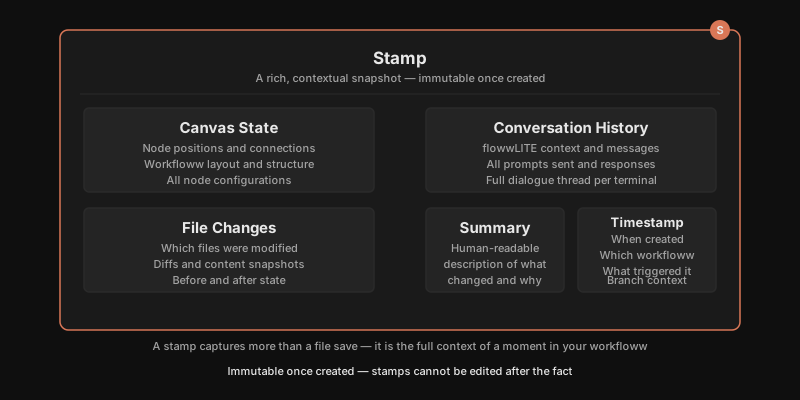
Each stamp records:
- The state of all nodes and connections on the canvas
- The conversation history in active flowwLITE nodes
- File changes associated with the workfloww
- A human-readable summary of what changed and why
- The timestamp and workfloww context
Stamps are immutable once created. You can browse historical stamps to see how a workfloww evolved, compare stamps to understand what changed between moments, or restore a previous stamp to return to an earlier state.
Why It Works This Way
Most version control tracks what bytes changed. Stamps track what happened and why. A stamp includes the spatial state of the canvas, the conversation context that led to the change, file modifications, and an intelligent summary. This makes history reviewable as a story, not a series of diffs. You can browse stamps and understand the arc of a project — not just the final state, but the decisions and explorations that led there. History in floww is designed to be read and understood, not just restored.
In Practice
You are halfway through refactoring an API. Claude has rewritten three endpoints and modified the router. A teammate asks you to investigate a production bug. Rather than losing your context, you create a manual stamp — “mid-refactor, endpoints complete, router pending.” You switch to a new workfloww to investigate the bug. An hour later, you restore the refactoring stamp. The canvas returns to its exact state — node positions, conversation history, partial file changes — all intact. You pick up exactly where you left off.