canvas
On this page
What is the Canvas?
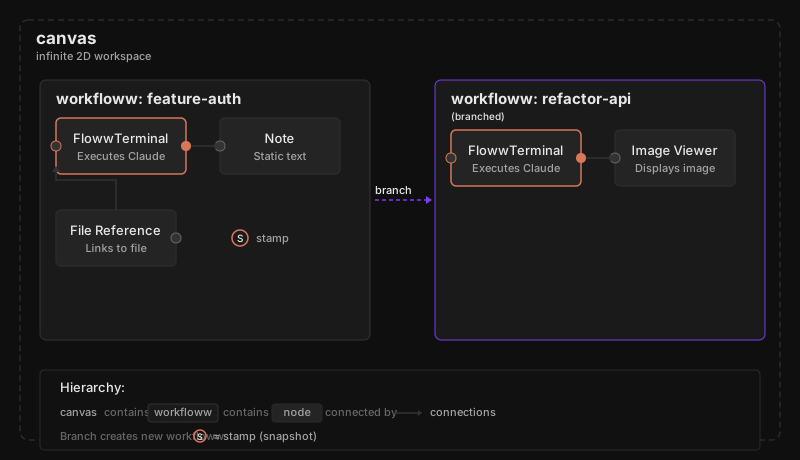
The canvas is the infinite 2D workspace that forms the central interface of the floww desktop client. Every node, every workfloww, every stamp exists on the canvas. It is the single surface where all work happens — there are no hidden tabs, no background processes, no separate views. If it exists in your project, it is visible on the canvas.
The canvas supports panning (moving your view across the workspace) and zooming (adjusting your level of detail). You can zoom out to see the full shape of a project’s workflowws, or zoom in to focus on a single flowwLITE conversation.
Spatial Organization
Nodes are positioned freely on the canvas. Their spatial arrangement communicates structure — related nodes are grouped together, sequential steps flow left-to-right or top-to-bottom, alternative approaches branch visually. This spatial awareness is a core part of floww’s design philosophy: the shape of your work on the canvas reflects the shape of the work itself.
Stamps on the Canvas
When a stamp is created, it captures the canvas state at that moment — every node’s position, every connection, every conversation. Browsing historical stamps lets you see how the canvas evolved over time, providing a visual history of your project that goes beyond file diffs.
The Canvas as Workspace
The canvas is not a visualization of something that happens elsewhere. The canvas IS where work happens. Creating nodes, connecting them, executing Claude through flowwLITE, branching workflowws — all of these actions occur directly on the canvas. This is what makes floww a visual AI workspace rather than a traditional IDE with a visual overlay.
Why It Works This Way
Tabs hide information. When your API work is in one tab and your database schema is in another, you lose the spatial relationship between them. The canvas keeps everything visible and spatially arranged — related work is near each other, diverging work branches away visually. This is not a metaphor; it is a literal spatial representation of project structure. The infinite canvas has no edges, so projects of any complexity have room to grow without reorganization. You never lose something behind a tab, and you never need to mentally reconstruct context you can already see.
In Practice
Your project has grown to five workflowws — an API integration, a UI redesign, two Claude-driven refactoring branches, and a documentation pass. You zoom out on the canvas. The spatial layout reveals the project’s shape instantly: the API work clusters in the upper left, the UI redesign sprawls across the center, and the two refactoring branches diverge from a shared stamp. Without reading a single line of code, you can see which parts of the project have the most activity, where branches converged, and which workflowws were archived after exploration.