floww
What is floww?
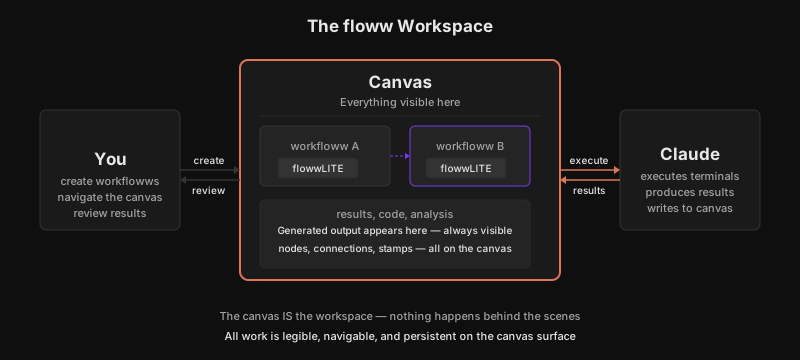
floww is the visual AI workspace — a desktop application built on an infinite canvas where you work with AI through visual, node-based workflows. You open a project folder, create workflowws by connecting nodes on the canvas, and execute them with Claude through flowwLITE nodes.
Nothing is preset. Users create their own hyper-curated workflows through flowwLITE nodes that automatically branch and stamp when meaningful events occur. The canvas IS the workspace — there are no hidden panels, no behind-the-scenes processes. Everything you do is visible on the canvas.
The Two Clients
floww has two interfaces that serve the same purpose from different angles:
- floww (Desktop Client) — The canvas where you see the shape of your work. Built with Tauri v2, React 19, and Rust. This is the visual interface.
- flowwCLI (Terminal Client) — What you are inside of when you are doing the work. The terminal-based interface for the same planning and execution system.
Both draw from the same plans, the same state, the same understanding of what done looks like.
Philosophy
floww stands next to Claude as a partner, not a competitor. Claude generates. floww shapes, organizes, visualizes, and manages. Think of it as the Photoshop to Claude’s camera — the creative workspace that gives structure to what AI produces.
Why It Works This Way
Most AI tools optimize the chat interface — make the conversation faster, the context longer, the responses smarter. floww takes a different path: make the work visible. When you can see the shape of your project — which workflowws branched, where stamps were created, how nodes connect — you make better decisions about what to do next. The visibility IS the product. Claude is already smart. What it needs is a workspace that matches how complex work actually unfolds: non-linearly, in parallel, with branching decisions. A canvas-first design is not a cosmetic choice — it is an acknowledgment that the hardest part of working with AI is not generating output, but keeping track of what was generated, why, and what to do with it.
In Practice
You open a project folder — a half-finished API with three services that need connecting. The canvas appears, empty. You create a workfloww called “service-integration” and add a flowwLITE. You describe the architecture to Claude. As Claude works through the integration, a second approach emerges — a different data flow pattern. The flowwLITE auto-branches: now you have two workflowws, side by side on the canvas, each exploring a viable path. When service A is working in the first branch, a stamp captures the moment. You can see the whole story on the canvas — two approaches, one chosen, the history intact.